What Does VOX Mean On A Baby Monitor? VOX Mode Explained Simply:

You’ve finally tucked the baby in, but instead of relaxing, you’re staring at a cryptic setting on your new gadget: VOX Mode! What does VOX mean on a baby monitor, and why is your screen suddenly going dark? Don’t panic—your monitor isn’t broken, and you haven’t missed a beat.
VOX on a baby monitor stands for Voice Operated Exchange. It is a sound-activated mode that keeps the monitor in standby until your baby makes noise. When sound is detected above a set threshold, the screen and audio automatically turn on so you can check on your baby.
In simple terms, VOX helps you monitor your baby without keeping the screen and audio running all the time.
VOX is one of the most helpful features on many baby monitors once you understand it. In this guide, I’ll walk you through exactly what VOX means, how it works, when to use it, and how to set it up so you can sleep a little easier tonight.
In This Guide:
What Does VOX Mean On A Baby Monitor?
VOX mode is a power-saving and sound-activated feature built into many baby monitors. Instead of streaming video and audio continuously, the monitor stays quiet and dark until it detects sound from the nursery.
There are usually two main modes of monitoring for most baby monitors:
VOX Mode vs Continuous Mode (Quick Comparison):
| Feature | 🔴 Continuous Mode | 🟢 VOX Mode |
|---|---|---|
| Screen | Stays on all the time | Turns off when room is quiet |
| Audio | Always active | Mutes during silence |
| Activation | Constant live monitoring | Activates only when sound is detected |
| Battery Life | Uses more battery | Saves battery life |
| Noise Level | Can create constant background noise | Reduces noise and distractions |
- Continuous Mode: The screen is always on, and the speakers are always emitting sound (including that “fuzz” or static noise). This drains the battery faster than a toddler drains a juice box.
- VOX Mode: In this mode, your monitor screen stays dark, and the audio stays silent until your baby makes a noise that hits a certain volume. Once they cry or fuss, the monitor “wakes up” and alerts you.
Think of VOX as a smart “sleep mode” that wakes up only when your baby does.
How VOX Mode Works (Step by Step):
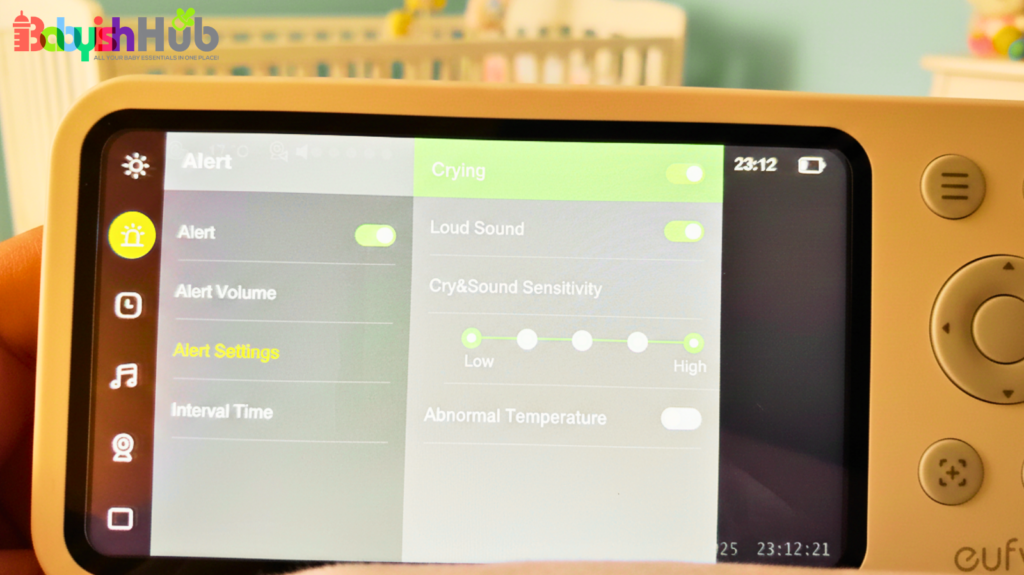
VOX is always listening in the background, but it only fully activates when needed. Here’s a step by step guide on how it works:
- Standby: When the nursery is quiet, the monitor screen turns off and audio is muted. The system continues monitoring sound levels in the background.
- Detection: The microphone is still “listening,” but it’s filtered. It’s waiting for a sound that is louder than the baseline room noise.
- Activation: The moment your baby lets out a “hey, I’m awake!” squawk, the parent unit triggers. The screen pops to life, and the audio kicks in instantly.
- Reset (Return to standby): Once the baby settles back down and the room is quiet for a minute or two, the monitor tucks itself back in and goes dark again.
A Relatable Example: If your baby just rolls over or let’s out a tiny, sleepy sigh, a well-calibrated VOX mode will stay quiet, letting you keep sleeping. But the moment that “sigh” turns into a “sob,” the monitor taps you on the shoulder. It’s the ultimate filter for the “active sleeper” stage!
VOX Sensitivity Levels Explained:

Why parents choose it: High sensitivity helps you catch early signs of waking, but it can also lead to more frequent screen activation if the room is not completely quiet.
Most baby monitors let you adjust VOX sensitivity, which controls how easily the device reacts to sound in the nursery. In simple terms, it determines how loud a noise must be before the monitor “wakes up” from standby mode.
Choosing the right setting is important because it directly affects how often your screen turns on, how many alerts you receive, and how well you sleep at night.
Low Sensitivity (Less Reactive Mode)
Low sensitivity means the monitor only activates when it detects clearly loud sounds, such as crying or strong fussing.
What it does:
- Requires louder noises to trigger activation
- Ignores small movements like shifting or soft babbling
- Filters out most background sounds
Best for:
- Older babies or toddlers who move around a lot in their sleep
- Noisy environments (shared rooms, busy homes, street noise)
- Parents who want fewer interruptions during the night
Why parents choose it: Low sensitivity reduces unnecessary screen activations, which helps prevent false alarms and sleep disturbances.
Medium Sensitivity (Balanced Default Setting)
Medium sensitivity is the standard recommended setting on most baby monitors.
What it does:
- Detects normal crying, fussing, or vocal sounds
- Ignores minor movements like rolling over or gentle rustling
- Filters moderate background noise
Best for:
- Most newborns and infants
- Average household environments
- Parents who want a balanced level of awareness
Why parents choose it: This setting offers the best mix of responsiveness and stability. It is usually the safest starting point when first setting up VOX mode.
High Sensitivity (Maximum Detection Mode)
High sensitivity makes the monitor highly responsive to even the smallest sounds.
What it does:
- Detects soft noises like whimpers, sighs, or rustling sheets
- May react to background sounds such as white noise machines or fans
- Activates more frequently than other settings
Best for:
- Newborn babies who need close monitoring
- Parents who prefer early alerts before full crying starts
- Quiet rooms where even small sounds matter
How To Choose the Right VOX Sensitivity:
The best VOX setting depends on three key factors:
- Baby’s age: Newborns usually need higher sensitivity, while older babies do better with low or medium settings
- Sleep behavior: Light sleepers or active movers may require lower sensitivity
- Room environment: Noisy rooms benefit from lower sensitivity, while quiet rooms allow higher settings
In most cases, Medium sensitivity is the best starting point, and you can adjust up or down based on real-life performance over a few nights.
VOX Low vs High (What’s the Difference?)
One of the most commonly searched questions parents have is the difference between VOX Low and VOX High sensitivity settings. The difference mainly comes down to how easily the monitor reacts to sound in the nursery as explained below.
VOX Low (Less Sensitive Mode)
VOX Low is designed to reduce unnecessary activations and focus only on clear, strong sounds.
How it works:
- Less sensitive to sound changes in the room
- Activates only when your baby is clearly crying or making louder noises
- Filters out minor movement, breathing sounds, and background noise
Best for:
- Older babies or toddlers who move frequently in sleep
- Noisy households or shared rooms
- Parents who prefer fewer alerts and less screen activation
VOX High (More Sensitive Mode)
VOX High is designed for early detection and maximum responsiveness.
How it works:
- Highly sensitive to even faint sounds
- Activates for whimpers, rustling, or early signs of waking
- May also pick up environmental noise like fans or white noise machines
Best for:
- Newborn babies who need close monitoring
- Parents who want early alerts before full crying starts
- Very quiet nursery environments
Here’s a simple way to choose between the two settings:
- If you want fewer interruptions: use VOX Low
- If you want earlier warning signs: use VOX High
Quick Tip: In real-world use, many parents settle on Medium sensitivity because it balances both detection and stability.
Is VOX Mode Safe To Use?
Yes, VOX mode is safe to use. It’s important to understand that the VOX mode is activated, your monitor isn’t “off”—it’s on standby. The internal “ear” of the monitor is always working. As long as you have tested the sensitivity and the monitor is within its signal range, it will trigger when necessary.
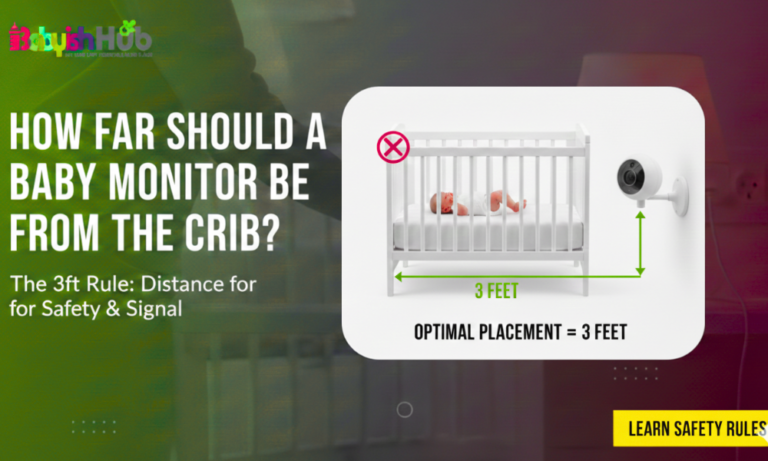
Pro-Tip: I strongly advise you to always place the camera about 3–6 feet from the crib. Too far, and even a loud cry might not trigger a “Low” VOX setting. Too close, and the cord could be a safety hazard.
When Should You Use VOX Mode?
After three kids, I’ve found that the VOX button is usually the difference between a restful night and “monitor-hovering” exhaustion.
Here is when I tell my fellow parents to lean on that VOX setting:
- Overnight: This is the MVP use case. It allows you to sleep in a quiet room, only waking when your baby needs you.
- Nap Times: If you’re downstairs doing chores, having VOX activated ensures the battery doesn’t die before your baby’s nap is over.
- Small Homes: If you can practically hear the baby through the wall anyway, then you can use VOX as a backup alert rather than a primary tether.
When You Might Turn VOX Off
These are times when VOX mode is less helpful, and the “Continuous Mode” is the better choice for you:
- The Newborn Stage: When they are tiny, and their cries are more like little kitten squeaks, you might feel more comfortable hearing every breath.
- Medical Concerns: If your baby has respiratory issues or you are monitoring for something specific, I advise you to keep the audio on 24/7.
- Sick Days: When my kids have a fever, I keep the monitor on “Always On” so that I can hear their breathing patterns.
This is how to turn off VOX on baby monitor: To turn off VOX mode, press the Menu button and locate the VOX or ECO icon (often a face or speech bubble). Toggle the setting to OFF. If the screen still goes dark, check for a separate “Screen Save” or “Sleep” timer in your settings and disable it to ensure a continuous stream.
Common VOX Problems and Fixes:
Most “glitches” you experience with VOX mode are mostly calibration hiccups. Here’s how I would troubleshoot these moments:
“My monitor won’t turn on even when he’s crying!”
- The Fix: Increase the sensitivity to “High” and move the camera slightly closer to the crib (but make sure it’s at least 3ft away).
“The monitor stays on all night because of the sound machine!”
- The Fix: This is a classic. Move the white noise machine further away from the camera microphone or lower the VOX sensitivity.
“The screen is flashing on and off.”
- The Fix: Your VOX sensitivity is likely right on the “edge” of the ambient room noise. Lower the sensitivity by one notch.
Does VOX Affect Radiation or Signal Emission?
For the parents who worry about EMFs emissions from baby monitors, VOX is actually a great feature. Because the monitor isn’t constantly transmitting a high-bandwidth video signal 24/7, it significantly reduces the amount of time the device is emitting a signal. While it doesn’t eliminate it entirely (the unit still “pings” the parent unit to stay connected), it’s a much lower “digital footprint” than continuous streaming.
Pros and Cons of Using VOX Mode:
Now that you know what does vox mean on a baby monitor, you might wonder if this is a must-use for you. VOX mode is a godsend feature for some, but for others, it’s just another setting to overthink. To help you decide if you’re a “VOX family” or a “Continuous Stream” family, I’ve broken down the highs and lows of using this feature below:
| Pros | Cons |
| Longer Battery Life: Lasts way longer off the charger. | Delay: There is often a 1-2 second delay for the screen to pop on. |
| Helps You Sleep Better: Eliminates constant static or “blue light” in your bedroom. | Sensitivity Learning Curve: Takes a few nights to find the “sweet spot.” |
| Reduced Wear: Extends the life of the screen and battery. | Quiet Sounds: You might miss the “cute” babbling that happens before a cry. |
How To Turn On VOX Mode:
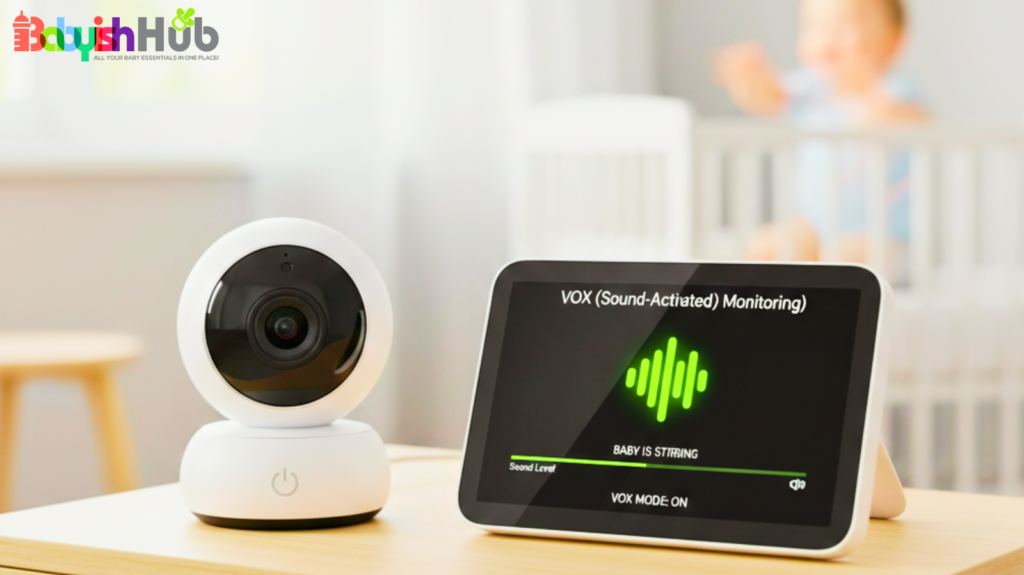
Here is your “no-brain-power-required” guide to getting VOX up and running before your head hits the pillow:
Step 1. Enter the Menu: Look for a gear icon or a button labeled “Menu.”
Step 2. Find VOX/Eco: Some brands (like Philips Avent) call it ECO mode. Others call it VOX.
Step 3. Adjust Sensitivity: Start with the Medium level.
Step 4. The “Test Run”: Put the baby in the crib (or have your partner stand in the nursery), go to your room, and have them make a moderate noise. Ensure the monitor wakes up within 2 seconds.
FAQs About VOX on Baby Monitors
Got a burning question about that mysterious VOX button? I’ve rounded up the most common “panicked parent” questions right here for you:
Is VOX the same as Eco Mode?
Mostly yes, VOX and Eco mode are essentially the same feature on most baby monitor models. However, it’s important to understand that the Eco Mode usually takes it a step further by shutting down the signal transmission almost entirely until sound is detected to save maximum power.
Should VOX be on or off at night?
If you are a light sleeper, be sure to keep it ON. If you are a very heavy sleeper who might sleep through a distant cry, keep the volume on Continuous but turn the screen brightness down.
Can VOX work on WiFi monitors?
Yes, VOX mode works on WIFI monitors, but it usually manifests as “Push Notifications” on your phone rather than the screen turning on and off.
What does VOX activated mean on a baby monitor?
When VOX is activated, your monitor enters a power-saving “sleep” state where the screen and audio remain off until sound is detected. The microphone stays active in the background, automatically “waking up” the parent unit the moment your baby cries or makes a noise above your set threshold.
Is a higher VOX level more sensitive?
Usually, yes. On most monitors, a “High” setting means the microphone is at its most sensitive, triggering the screen for small sounds like whimpers. However, you should check your manual; some brands use “Level 1, 2, 3” where Level 1 is the most sensitive. Always test with a clap first!
What does VOX High mean?
VOX High typically refers to the highest sensitivity setting. In this mode, the monitor will trigger for almost any sound, including soft babbling, shifting blankets, or even a loud white noise machine. It is the best setting for newborns when you don’t want to miss a single peep.
How to use VOX on a baby monitor?
To use VOX, enter your monitor’s settings menu and toggle “VOX” or “Eco Mode” to ON. Next, select your sensitivity level—start with Medium. Place the camera near the crib and test it by making a noise to ensure the parent unit wakes up and displays the video clearly.
What is VOX mode on a Hello Baby monitor?
On a Hello Baby monitor, VOX mode is a sound-activated power-saving feature. When enabled, the screen turns off after about 30 seconds of silence. It is specifically designed to extend the handheld unit’s battery life and eliminate the glowing “blue light” in your bedroom while you try to sleep.
What does VOX mean on a VTech baby monitor?
On VTech models, VOX acts as the “Sound Detection” trigger. It stops the constant transmission of video and audio to reduce power consumption and signal interference. The monitor remains “dark” until the nursery noise reaches your chosen decibel level, at which point the display and sound kick back in.
How to turn off VOX on a Hello Baby monitor?
To turn off VOX on most Hello Baby models, press the Menu/OK button, navigate to the VOX icon (usually a face or speech bubble), and select OFF. This keeps the screen and audio on continuously. You can also quickly toggle it by tapping the Power/LCD button on some units.
So, Should You Use VOX?
I know the urge to stare at that screen all night, but your sleep matters too. Understanding what does VOX mean on a baby monitor is honestly good for your sanity’s sake. Going VOX mode doesn’t mean ignoring your little one; it means trusting your gear so you can get some time to recharge. Give yourself permission to turn it on, set that sensitivity to medium, and get some rest. You’re doing an amazing job, mama! Now go catch some Z’s while the monitor pulls the night shift!